Thursday, April 19, 2018

playing with facial recognition library

Deep learning and facial recognition is getting easier to implement these days. Tried to recognize japanese actresses with a face recognition library.

Instructions to build and run it in docker
1. Clone it from github
git clone https://......

2. docker build .

3. Create a directory that shared with the docker container.
mkdir face_recognition_docker

4. Run the docker image and link the new directory to the container
docker run -i -t -v ~/face_recognition_docker:/home /bin/bash

5. put images in face_recognition_docker directory. 
training data in face_recognition_docker/known_people. 
unknown image in face_recognition_docker/unknown.


6. run the command in the docker container. To know more about the parameters check the github page.
For example,
root@123456:/home# face_recognition --cpus -1 --tolerance 0.45 known_people/ unknown/
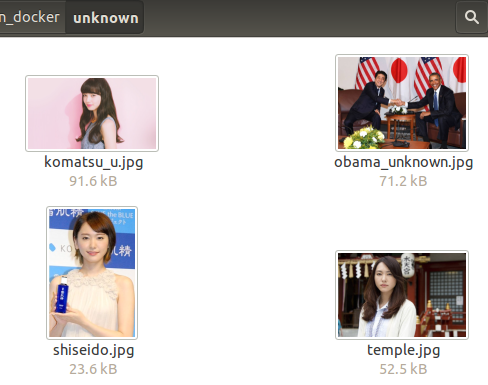
unknown/shiseido.jpg,yui
unknown/temple.jpg,yui
unknown/komatsu_u.jpg,komatsu
unknown/obama_unknown.jpg,unknown_person
unknown/obama_unknown.jpg,President_Barack_Obama

I needed to adjust the tolerance value as the pre-trained face model does not work very well on asians. You can see that face is recognized even if it is from difference angle for komatsu_u.jpg. Also unknown face is identified on the obama_unknown.jpg. Interesting result.

link
medium article
github code
docker image (didn't try)

Sunday, May 15, 2016

Facebook Messenger chat bot on AWS Lambda

Facebook and Line both announced their own messenger bot platform. Tried to develop a sample bot on AWS Lambda.
Took some time to get the HTTP request passed from AWS API Gateway to AWS Lambda function. Choose to do it in Node.js as I found an example online in medium blog.

Network diagram


Developed a simple bot that spill out the suggested recipe if you send him the ingredients.

For example, you send "Tomato egg" to the bot, it will response with recipe link and photo.


Will publish the source code soon when I have time.

Reference
Run Facebook Messenger Chat Bot on AWS Lambda (Medium.com)

Sunday, July 19, 2015

run your own high-end cloud gaming service on EC2 (Windows edition)

Stumbled upon this blog post about using AWS EC2 for gaming.

- The openvpn settings file provided are supposed to be used with TunnelBlick on Mac. Faced some problems with openvpn client in windows. Zerotier or hamachi should be easier to setup. Steam client detected the client after I connect with Zerotier.

- Streamed Final Fantasy XIII-2 and Borderlands 2. Borderlands was playable albeit a little laggy. FFXIII has some issues with the audio, constantly beeping in the background.

- Tried this on 30Mbit broadband. Will test this again when I get higher speed internet connection.

Tuesday, June 18, 2013

Android ADB devices offline

Most of the solutions found on the internet ask you to kill and restart adb server.

adb kill-server
adb start-server

unplug and plug in the mobile phone
uncheck and check the usb debugging option

This does not fix my problem.

Android 4.2.2 has a new security feature where user has to confirm the RSA signature of the computer before it is allowed to connect to the phone. Old version of ADB does not support this feature and will always show your device as offline.

Solution:-
1. Check your adb version and where your adb command points to, on my case, there is an older version of adb at /usr/bin.
adb version
Android Debug Bridge version 1.0.29

type -a adb
/usr/bin/adb

2. Delete the old adb and fastboot. Ubuntu's apt-get installed the outdated version.

cd /usr/bin
sudo rm fastboot
sudo rm adb

3. Download ADT/SDK from http://developer.android.com.
4. Update your system PATH and points to the updated adb

gedit .bashrc (ubuntu, replace with any other text editor you like)
add this to the last line of the file

export PATH=$PATH:...../adt-bundle-linux-x86_64-20130522/sdk/platform-tools (please replace it with the path to the sdk you downloaded)

5. Check your version again

type -a adb
.../adt-bundle-linux-x86_64-20130522/sdk/platform-tools/adb

adb version
Android Debug Bridge version 1.0.31

6. Plug in your phone and enjoy!

Sunday, April 21, 2013

Ambient Lighting Monitor with Android and Java

Fascinated by Arduino and Raspberry Pi recently. Found a cool application called "Ambient Lighting" which calculates the light on your monitor and changes the color of the LED accordingly. The effect is real time cinema-like movie watching experience.

Note that this video is stolen from http://brunql.github.io/ambilight/


Most of them are using LED with Arduino controller. None of the people think of using the screen of the mobile phone or tablet as a light source (they are probably too dim for the desired effect which I found out later).

This is a quick hack during the weekend, firstly take a screenshot of the current screen. It was easier than I thought using the Java built-in function of java.awt.Robot, createScreenCapture(). After that get all the Red, Green and Blue of each pixels and calculate the average color for the current screen. Ratios of the color according to the different positions such as main color on the top right or bottom left portion of the screen are ignored as my light source is limited (1 or 2 android phone) and could not display different color on each spot.

After that, I need a simple way to send the color data to the android phone. I got lazy and just use Simple Framework to serve HTTP response on configured port. For example, every time the phone send request to http://my_ip:7788, it would return the calculated average color for current screen. To make it easier, I return a simple HTML code to set the background color of the whole page with the calculated RGB value. The page will reload every 1 second using HTTP "META refresh" tag. Reload the page more frequently with javascript should result in a more realistic ambient lighting.

The result is less satisfactory than had been anticipated. The screen of the mobile phone is not as bright as expected even after manually tuning it to the maximum brightness. Probably can improve the effect after tuning the calculated color to make it look brighter. Position information should make multiple phones and tablets act as the "LED", albeit much more expensive. Just for the sake of fun as I have a couple of Android devices hanging around.

I have published the code on bitbucket and feel free to have a look if you are looking to waste some time to enhance your movie watching experience. =)

My code on bitbucket
Ambient light

Reference:
http://brunql.github.io/ambilight/
https://code.google.com/p/boblight/
https://code.google.com/p/light-pack/
http://learn.adafruit.com/adalight-diy-ambient-tv-lighting/download-and-install

Sunday, April 22, 2012

注音轉成拼音


時常看不懂Facebook上朋友寫的注音文。昨晚心血來潮用Javascript寫了一個轉換的程式。之後發現轉成拼音了仍然看不懂。驚!有待改進。

用javascript寫的原因是以後有時間可以將之變成chrome extension。Chrome extension主要是由javascript與網頁包裝而成的。那樣就可以隨時翻譯網頁上的注音文了。=)

可以把注音文貼在這裡然後按轉換的按鈕


解釋
要來喝一杯ㄇ
ㄇ念成m或ma。所以這里可以翻譯為"嗎"。(純屬猜測)

程式的流程
主要是將textarea裡的文字,呼叫javscript的string.replace()。

例:string.replace(new RegExp('ㄦ', 'g'),'er') - 將所有'ㄦ'換成拼音的'er'。

'g' 為global的意思。不那麼寫的話只有第一個matching的字體會被轉換。之後就呼叫alert()將結果顯示出來。

相關連結
注音符號列表 (維基百科)

Monday, April 9, 2012

讀電腦的沒有前途?

"現在電腦領域改變太快了。"
雖然這領域日新月異,不過舊式的語言與機器都還是存在的。目前的電腦跟1940-1950時Von Neumann所提出的規格沒什麼兩樣。Python、Ruby等新語言當然可以減輕寫程式的負擔,不過主要的邏輯是沒變的。舉個例子,表達能力沒有問題的話,用英文、中文、日文都沒差,只是需要去瞭解它們的語法與用詞。

C++目前還是很普遍的語言。主要是它的效能比較好,firefox、chrome都是C或C++的啊。就算是Java的VM也是吧。我所知道的,馬來西亞金融機構後端server主要還是使用舊式的電腦(Mainframe)和語言(RPG),主要是因為牽涉太廣,沒必要去更換。可能你看到硬體、手機不斷推陳出新,所謂的雲端,背後還是一堆平凡的電腦。Web 2.0、Web 3.0雖然也會有些不同,不過感覺都是行銷的人想出來的用語。

"需要一直學習新東西,老了之後跟不上"
對,年紀大了記憶力分析力也許會減退,不過隨著資歷增長,所做的層面也有說不同。不需要凡事親力親為,有經驗的人看事情比較全面,可能可以從事策劃之類的。其他的領域也是大同小異吧。當然這也讓我們時時警惕自己,30歲前要賺取第一桶金!

從Apple的個人電腦、Microsoft的作業系統、Netscape遊覽器、人工分類網頁的Yahoo、利用演算法分類網頁的Google、讓人們互動的Facebook、智能手機、平板電腦、App Store…… 每一波新的潮流出現勢必讓一群人暴富,而且頻率與速度也越來越快。

Apple發明了圖形介面(也可以說是Xerox),電腦螢幕不再只是沉悶的文字。Microsoft向IBM提出了軟體授權的概念,軟體低成本的reproduce費用(只是光碟的費用),讓它的盈利飆高。隨著遊覽器的改進(AJAX等),遊覽網頁不再是單方向的行為,人們可以透過網頁跟朋友互動--所謂的社交網站。可想而知人們平均停留在Facebook的時間比在Google上搜尋的時間長。對大部份的盈利都是來自于網頁上的廣告的Google來說這是一項威脅。從這裡可以看到科技行業後浪推前浪的景象。

App Store建立了手機使用者與軟體開發者之間的橋樑,開發者不再被手機廠商、不同國家的電訊業者與關稅條款束縛。只要是有品質的軟體就會被全世界的使用者認同。Angry Birds熱潮后誰會意料到Draw Something的崛起。Draw Something早前已被Zynga收購,謠穿約180 million USD。

這還是一個充滿機會的領域。有能力的人就能突圍而出,創造 "A dent in the universe"。讀著Steve Jobs的自傳,心中燃起了一團火,希望可以維持下去。

以上是小弟的拙見,如有說錯的地方敬請高人賜教。我確信行行都能出狀元。做自己喜歡的事情,不管是不是熱門的一定可以闖出一片天。